
Cherry Audio Harmonia Explained: Additive Synthesis and Oscillator Design
How does Cherry Audio Harmonia work, and how does its combination of eight frequency layers, sampled waveforms, harmonic ratios and semitone tuning relate to additive synthesis?
A different way to think about additive synthesis
Cherry Audio's Harmonia is one of my go-to synthesizers when I need to design a specific sound. Alongside Cherry Audio's Dreamsynth and u-he's veteran Zebra 2, it offers a broad palette for building sounds that go beyond conventional subtractive synthesis.
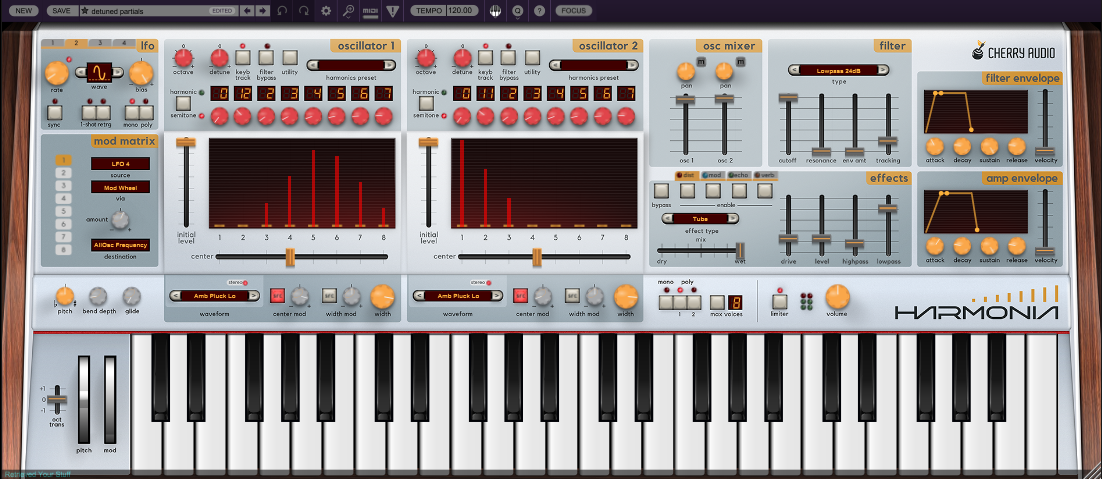
Harmonia is particularly interesting because it invites us to think about a sound as a collection of frequency layers that can be tuned, balanced and modulated independently. But there is an important twist: these layers do not have to be simple sine waves. They can contain complex sampled sounds, each with its own spectrum.
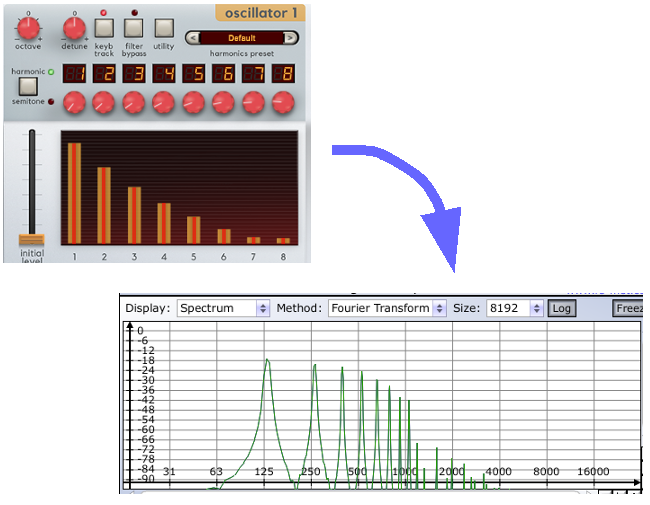
To understand what makes Harmonia special, we need to look at the relationship between its oscillator architecture and the principles of additive synthesis.
Two oscillators, eight frequency layers each
At the heart of Harmonia are two oscillators with essentially the same functionality. Each can play up to eight copies of a selected waveform or sample, with each copy tuned to a different frequency.
It is useful to think of these eight components as frequency layers. Harmonia's interface and synthesis concept invite us to treat them as partials, but their actual spectral content depends on the sound loaded into each layer.
If we load a sine wave, each layer produces a single frequency. If one layer plays the fundamental pitch and the others play higher frequencies, we can construct a spectrum from the fundamental and up to seven additional components.
This is the classic idea behind additive synthesis: create a sound by combining individual frequency components and controlling their relative amplitudes.
However, Harmonia does not force us to build every sound from sine waves.
What happens when we load a complex sound?
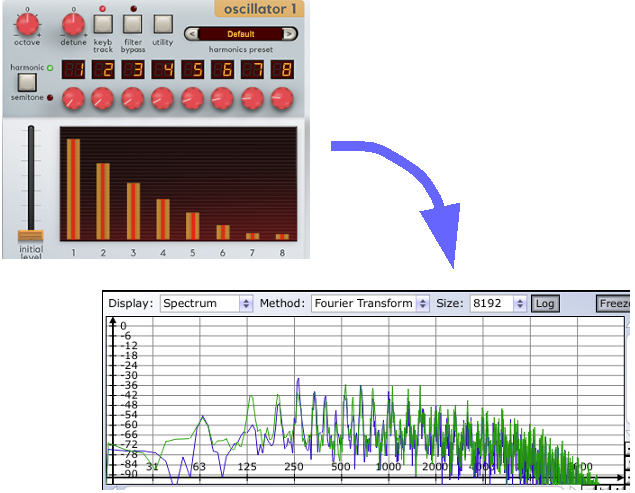
Harmonia allows us to load a wide range of sampled waveforms and sounds into its frequency layers. These can include basses, guitars, drones, keyboard sounds, noise, orchestral sounds, tuned percussion and vocals, as well as user-supplied samples.
Imagine loading an orchestral sample into an oscillator layer. Unlike a sine wave, this sample already contains a complex spectrum: a fundamental, overtones and potentially many other spectral components.
Harmonia can then play copies of that complex sound at different frequencies across its eight layers. Each layer contributes not just one frequency, but the spectrum of the loaded sample, shifted according to its tuning.
This is a crucial distinction. With sine waves, we are combining individual frequencies. With a complex sample, we are combining several versions of an already complex spectrum.
The result can be much richer than a conventional additive patch built from eight sine waves.
Harmonic ratios: building frequency relationships
Harmonia offers different ways to determine the frequencies of its layers. In Harmonic mode, the frequency of each layer is set as a multiple of the base frequency. The multiplication factor is adjusted using the red controls beneath the individual layer displays.
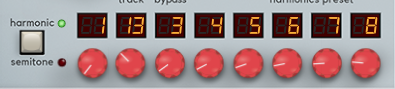
For example, one layer might be tuned to 13 times the base frequency, while another is tuned to three times the base frequency. These settings create specific frequency relationships that can dramatically change the overall spectrum.
When the layers contain sine waves, the relationship between their frequencies is relatively easy to understand: each contributes a discrete component to the resulting sound.
When they contain complex samples, the result is more involved. Each frequency relationship shifts the sample's entire spectrum, potentially producing dense and sometimes inharmonic combinations.
This is one reason Harmonia can be useful for experimental sound design. You can move between relatively coherent harmonic structures and more unusual spectral combinations without changing synthesizers.
Semitone tuning: turning frequency layers into musical intervals
Harmonia also allows its layers to be tuned in semitone steps rather than using harmonic multiplication factors.
Suppose we play the note C and use the first layer as the reference at zero semitones. A possible set of semitone offsets for the eight layers is:
| Layer | Semitone offset | Resulting note |
|---|---|---|
| 1 | 0 | C |
| 2 | +4 | E |
| 3 | +5 | F |
| 4 | +3 | E-flat |
| 5 | +6 | F-sharp |
| 6 | +7 | G |
| 7 | +9 | A |
| 8 | +11 | B |
The resulting collection is C, E, F, E-flat, F-sharp, G, A and B.
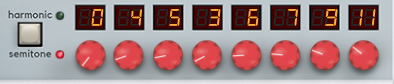
These are not simply harmonics of C. They form a collection of musical pitches, with each layer potentially contributing its own timbre. Depending on the sample, the amplitude balance and the tuning, the result may sound like a chord, a cluster, a complex ensemble or an unusual composite instrument.
The same approach works particularly well for ambient textures, sustained tones and sounds that occupy the space between a conventional chord and a single timbre.
Presets for faster exploration
We do not always need to enter every frequency relationship manually. Harmonia includes six presets for harmonic successions and 23 presets for semitone successions, effectively giving us ready-made starting points for different spectral structures and pitch collections.
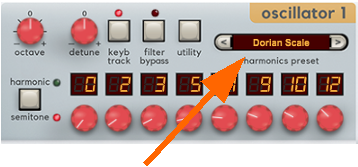
These presets are useful for exploring the instrument quickly. They are not limitations: once a succession has been selected, the individual layer settings can be adjusted to suit the sound we want.
A productive method is to begin with a preset, listen to the combined spectrum, and then change one or two frequency relationships at a time. This makes it easier to hear how the tuning of individual layers changes the character of the sound.
A substantial library of source sounds
Harmonia's supplied material includes a broad selection of source waveforms and samples:
- 8 basic sampled wave shapes
- 5 bass samples
- 6 guitar samples
- 8 drone samples
- 16 keyboard samples
- 11 noise samples
- 33 orchestral samples
- 9 tuned-percussion samples
- 24 vocal samples
- 89 additional sounds listed as Harmonia waves
You can also load your own sample files. This opens the door to using recordings, unusual acoustic sources, field recordings or sounds created in other synthesizers as the raw material for new spectral combinations.
The choice of source sample is fundamental to the result. Two patches using the same frequency ratios can sound entirely different when one uses a sine wave and the other uses an orchestral, vocal or noisy source.
Is Harmonia really an additive synthesizer?
The answer depends on how strictly we define additive synthesis.
In its traditional form, additive synthesis constructs a sound by summing individual sinusoidal components, each with its own frequency and amplitude. Harmonia can approach this model when its layers contain simple waveforms.
But its ability to play multiple copies of complex sampled sounds means that it is not limited to assembling isolated sine-wave partials. Each layer may contribute an entire spectrum, and the combination can become dense and complex very quickly.
For practical sound design, this is more important than arguing about a label. Harmonia gives us independent control over multiple frequency layers and lets us build sounds from both simple and complex source material.
That makes it a powerful instrument for exploring harmonic structure, musical intervals, spectral density and the relationship between pitch and timbre.
In the next article, we will look at a particularly interesting aspect of Harmonia: how its amplitude controls can be used to make the spectrum evolve over time, rather than remaining static.